
You finally find the perfect image for your project. The composition is right, the lighting is ideal, and the subject is exactly what you need. Then you notice it — a watermark stamped right across the most important part of the photo.
That single moment of frustration is something millions of creators, marketers, researchers, and online sellers deal with daily. For years, the only real fix was to open Photoshop and manually clone, heal, and patch pixels — hoping the end result does not look like a patchwork quilt.
That is where dewatermark technology changes the game. Removing watermarks from images you own or have the right to edit has become dramatically easier thanks to AI tools built specifically for this purpose. One platform generating serious attention in this space is Dewatermark.ai — a tool that promises fast, clean, AI-powered results without the Photoshop headache.
This article covers everything you need to know about it. You will learn how it works, who it is built for, what it costs, where it performs well, and where it falls short. By the end, you will have a clear picture of whether this belongs in your workflow.
What Does “Dewatermark” Actually Mean?
Before reviewing any specific tool, it is worth understanding what the process actually involves.
The term dewatermark refers to removing a watermark from an image or video — restoring the visual to its clean, unbranded original state. Watermarks exist for legitimate reasons. Stock photo agencies use them to protect assets before purchase. Photographers stamp their work to prevent unauthorized use. Brands overlay logos to maintain attribution across the web.
The problem arises when even legitimate image owners face unnecessary watermarks. A photographer who uploaded work through a platform that auto-adds branding. An e-commerce seller whose supplier provides product photos with the factory’s logo baked in. A researcher downloading from a licensed database they actively subscribe to.
In every one of these situations, removing the watermark is completely legitimate — and that is exactly the problem this kind of tool is built to solve.
Why Manual Methods Are No Longer Practical
Photoshop has long been the industry standard for this kind of work. Clone stamp, content-aware fill, healing brush — these are powerful features. But they demand time, skill, and patience that most people simply cannot afford to spend.
For someone processing 40 product photos before a store launch, spending 15 minutes per image in Photoshop adds up to hours of manual labor. AI-powered removal automates the heavy lifting, and modern inpainting technology produces results that are often seamless to the eye.
Introducing Dewatermark.ai — What It Is and How It Works
Dewatermark.ai launched in 2024 and has quickly become one of the better-known tools in the AI image editing space. It carries a 4.2-star rating across review platforms — a meaningful signal for a tool that has only been around for a short time.
The platform runs across web, iOS, Android, and desktop. No installation is needed for the browser version. You open a tab, upload your image, and the AI gets to work immediately.
How the Technology Works Behind the Scenes
The intelligence powering this platform is built on AI inpainting — a method where the model does not simply erase the watermark and leave an empty space. Instead, it analyzes surrounding pixels and reconstructs what the background should realistically look like. The result fills naturally into the rest of the image.
The process breaks down into four steps:
- Upload your image from your device or drag it directly into the browser window
- AI detection runs automatically, identifying watermark regions, logos, text overlays, and corner stamps
- Manual refinement tools are available if the AI needs correction in specific areas
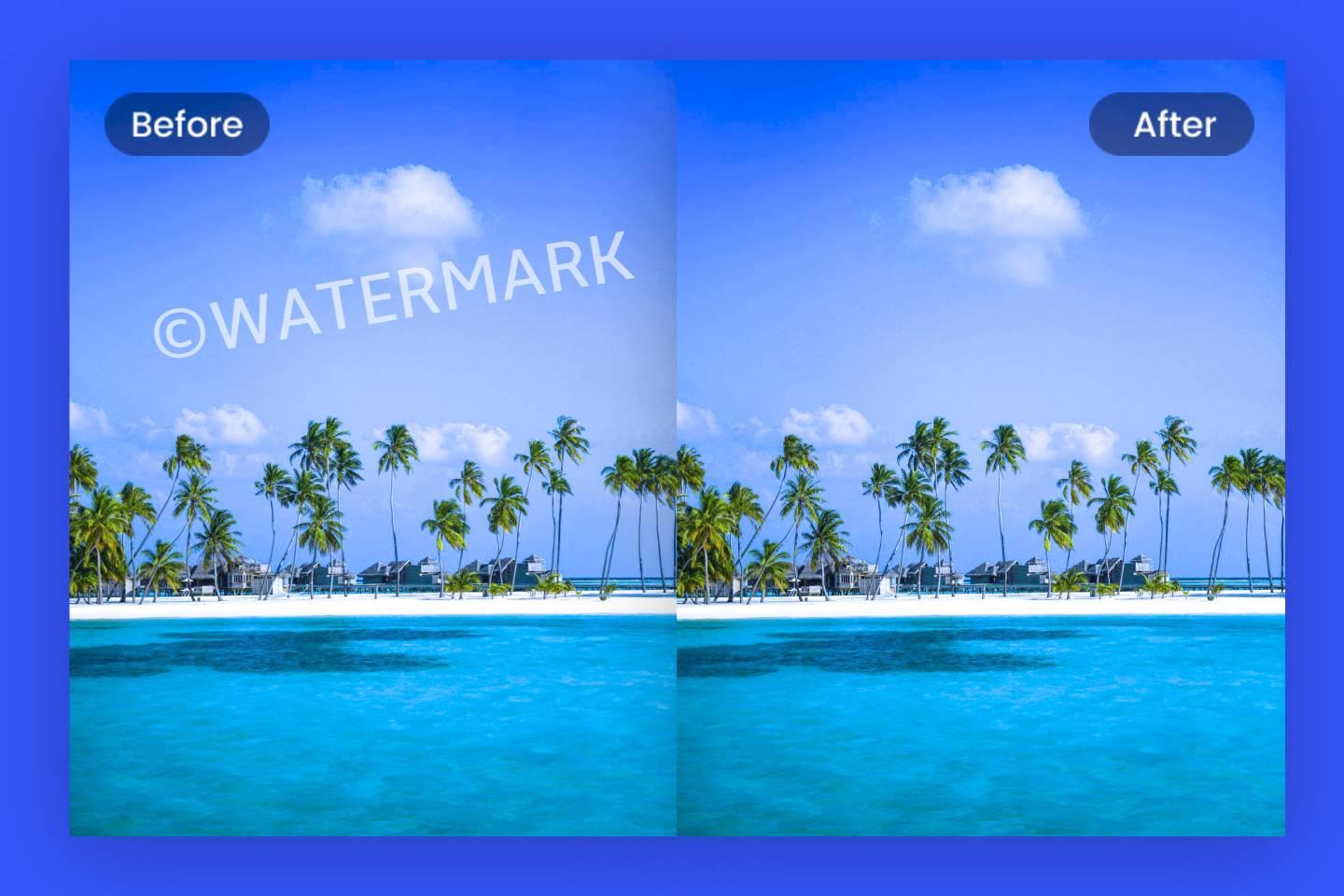
- Preview and download after reviewing a side-by-side before-and-after comparison
The before-and-after slider deserves a specific mention. Before you finalize the download, you drag a bar across the screen to compare the original and cleaned versions. That transparency is more useful than it sounds — you know exactly what you are getting before committing to a download or spending a credit.
Key Features of Dewatermark You Should Know About
Knowing what a tool can do is more useful than a feature bullet list. Here is what actually matters in practice.
Automatic Watermark Detection
The AI scans uploaded images and identifies watermark elements automatically — transparent overlays, corner stamps, center-placed logos, text branding, and repeating pattern watermarks. For most standard cases, one-click auto-removal handles the job without any input from the user.
Manual Precision Tools
When auto-detection is not enough — particularly with complex watermarks sitting over intricate backgrounds — the platform provides a manual brush tool, a Magic Wand selector, and an erase mode. These allow pixel-level control when the AI needs a bit of human direction to finish the job cleanly.
Batch Processing for High-Volume Work
One of the most practical features for professional users is the batch watermark remover. You can upload up to 50 images at once, and the system processes all of them simultaneously using cloud-based AI acceleration. Results return within seconds, and you can download everything as a ZIP file or grab images individually. This is a Pro plan feature — but for anyone handling product photography, marketing assets, or research materials at scale, it pays for itself quickly.
Cross-Device Access
The platform works seamlessly on desktop (Windows and Mac via the native app), web browser, iOS, and Android. Pro account credits carry across all devices, so switching mid-workflow is not a problem.
Image Quality Preservation
This is where AI watermark removal has matured significantly. Early tools in this category left blur, artifacts, or unnatural color shifts behind. The platform handles quality preservation by reconstructing removed areas using inpainting rather than blurring — even on textured product surfaces where a sloppy fill would immediately stand out.
The free plan delivers full-resolution downloads, which is worth highlighting. Many competitors compress outputs or add their own branding to free-tier exports. Here, you get three full-resolution cleanups per day without creating an account — and without a watermark added to your download.
Who Should Be Using a Tool Like This?
This platform is not built for one niche. The range of people who benefit from AI watermark removal is wider than most people assume.
E-commerce sellers are among the biggest beneficiaries. Supplier product images frequently carry factory logos or platform branding that conflicts with your store’s visual identity. Cleaning 40 product images manually in Photoshop is a half-day task. With batch processing, it becomes minutes.
Content creators who repurpose videos across platforms hit this problem constantly. Short-form content exported from one platform often carries that platform’s corner branding. When you want to repost your own material somewhere else, that branding becomes a real obstacle. An AI removal tool clears it efficiently.
Researchers and academics working with licensed visual reference materials often find that subscription databases watermark their images even for paying users. Removing those stamps for internal notes, private study, or publications is standard legitimate practice.
Photographers and designers regularly need to recover their own images from platforms that auto-stamp branding on uploads. Restoring your own work to its original clean state should not require an hour in Photoshop.
Real estate marketing teams pull property images from listing aggregators for campaign use. Those images often carry third-party platform branding that clashes with the agency’s visual identity and needs removing before publication.
Social media managers running campaign workflows often need clean visuals on short timelines. Waiting for a designer to manually clean an image is a bottleneck. Having a reliable removal tool in the workflow eliminates that delay entirely.
Dewatermark AI Review — Honest Pros and Cons
No tool is perfect. Here is an honest assessment of where this platform excels and where you should manage your expectations going in.
What Works Well
Speed is the first thing most users notice. Upload, process, done — results return within seconds. For anyone used to waiting on Photoshop to render content-aware fills across a large file, this feels almost jarring in the best way.
Ease of use is genuinely impressive. If you can drag a file into a browser window, you can use this tool effectively on day one. No tutorials, no manual reading, no setup.
The free tier is actually useful. Three full-resolution cleanups per day with no output watermark and no forced account creation is a more honest free offering than most competitors provide.
Privacy handling is responsible. Uploaded files are encrypted during processing and deleted immediately after. Nothing is stored on the platform’s servers — an important consideration for users handling client-owned or sensitive images.
The before-and-after comparison slider lets you verify the cleaned output before downloading. You catch any issues before committing, rather than discovering problems after the fact.
Where It Falls Short
Complex, center-placed watermarks that overlap the main subject of an image can push the AI beyond its comfortable range. When a watermark covers a face, a product’s key visual, or critical data in a chart, inpainting sometimes leaves visible inconsistencies. Manual brush refinement helps, but it adds time to the process.
Free plan batch limitations are real. The free tier does not support uploading multiple images at once. If you regularly process more than three images per day, you will hit the ceiling quickly.
No refund policy is currently in place. Credits expire at the end of your subscription period. The platform suggests using the free tier thoroughly before upgrading, which is sensible advice — but you should know before you commit.
Video support is limited. If your primary need is removing watermarks from video files, this is not the right primary tool. It is built for image workflows, and that focus is both its strength and its constraint.
Dewatermark Pricing — Free Plan vs. Pro Plan Breakdown
Here is exactly how the pricing is structured.
What the Free Plan Includes
Non-registered users receive two free cleanups per day. Registered users get three. These are full-resolution downloads — not compressed previews or downscaled versions. Ads appear on the free tier, which is a reasonable trade-off for genuine no-cost access. No credit card is required at any point.
The Pro Plan
The Pro plan is priced at $7.99 per month and includes:
- Unlimited watermark removal without daily caps
- High-resolution downloads without any advertisements
- Batch processing for up to 50 images simultaneously
- Email support from the team
- Desktop app access for both Windows and Mac
- API access for developers at a publicly listed per-image rate of approximately $0.04
Promotional discounts of up to 30% are offered occasionally. There is no standard student discount, but the promotional pricing brings the cost down meaningfully when it runs. Subscriptions are not auto-renewed, which removes the anxiety around unexpected charges. You choose to renew when your period ends.
Is Pro Worth It?
For casual users, the free tier is enough for occasional cleanup needs. For anyone running an e-commerce store, managing a content library, or processing images regularly for clients — the value calculation is straightforward. At $7.99/month, you save far more in time than you spend. Processing 50 images in seconds versus spending hours editing them manually is not a close comparison.
How Does It Stack Up Against Other Tools?
The watermark removal market has become fairly crowded. Here is an honest comparison with the tools most users are likely to consider.
Versus WatermarkRemover.io — The background reconstruction quality here tends to be cleaner, especially on textured surfaces. WatermarkRemover.io handles simple cases well but can struggle when backgrounds are detailed.
Versus Inpaint — Inpaint requires manual brushing throughout the entire removal process. This platform automates detection first and only involves the user when correction is needed. Speed advantage goes clearly to the AI-first approach.
Versus HitPaw — HitPaw offers stronger video watermark removal capability. If video is your primary format, HitPaw is worth a look. For image-focused work, the tools are more evenly matched.
Versus Pixlr — Pixlr is a broader image editor that requires manual effort specifically for watermark removal. A purpose-built tool is significantly faster and more accurate for this single task.
Versus Photoshop — For watermark removal specifically, the AI approach is faster, cheaper, and requires no technical skill. Photoshop’s content-aware fill is powerful in the right hands — but most users do not have those hands, and the subscription cost is considerably higher.
Tips for Getting the Best Results Every Time
Getting consistently clean outputs is partly about the tool and partly about how you approach each job.
Always start with your highest-resolution source file. The AI has more pixel data to work with, which improves the quality of the background reconstruction. Low-resolution inputs limit what inpainting can realistically achieve.
Let auto-detection run before you reach for the manual brush. In most standard cases, the automatic result is clean enough without any further input. You save time and often get a better result by letting the AI lead.
Use a smaller brush near watermark edges when doing manual refinement. Wider strokes near fine borders cause inpainting to bleed slightly, leaving a visible outline around the removed area.
Use the before-and-after slider seriously before downloading. Pay specific attention to the edges of the removed region — that is where artifacts tend to appear first when reconstruction has not been entirely seamless.
For batch jobs, group images with similarly positioned watermarks. The AI handles consistent inputs more predictably, and your review process becomes faster when output quality is uniform across the batch.
Legal and Ethical Considerations Worth Understanding
This section matters and too many articles skip past it.
Removing a watermark does not transfer copyright ownership. The original creator’s rights remain intact regardless of whether a visible watermark is present. Copyright attaches to the work itself, not to the overlay stamped on top of it.
Using a removal tool for personal or educational purposes — private study, reference files, editing practice — is generally acceptable territory. Using cleaned images commercially — in advertising, product listings, published content, or revenue-generating contexts — requires that you have proper rights or licensing to the underlying image.
Before removing a watermark from any image, the question is simple: do you own it, have you licensed it, or do you have explicit permission to edit it? If the answer to all three is no, the tool is not the problem — the image source is.
Responsible use is straightforward. This technology exists to help people clean up images they have every right to edit. Used within those boundaries, it is a genuinely valuable part of any professional creative workflow.
Conclusion
The tool does what it promises. It removes watermarks quickly, preserves image quality, and keeps the process simple enough that anyone can use it successfully on the very first attempt.
For content creators handling their own repurposed material, e-commerce sellers processing supplier images, photographers reclaiming their own work, and researchers working with licensed references — this fits naturally into the workflow and removes a genuine bottleneck.
The free tier is honest and usable. The Pro plan at $7.99/month is priced fairly for what it delivers. Batch processing alone makes the upgrade worthwhile for anyone handling more than a handful of images weekly.
The limitations are real but narrow. Very complex watermarks occasionally need manual refinement. Video support is limited. There is no refund window once you commit to a paid plan.
The practical fix for both: use the free tier first. Three full-resolution cleanups per day — no account required — is more than enough to evaluate whether it fits your specific needs.
If professional, clean visuals matter to your work, testing this tool takes less than five minutes. That is a low bar for something that has the potential to save you hours every single week.
FAQ 1: What is dewatermark and what is it used for? Dewatermark refers to the process of detecting and removing a watermark — such as a logo, text stamp, or transparent overlay — from an image or video to restore it to its clean, original state. Watermarks serve as visible claims of ownership, deterring unauthorized use of digital media across photography, stock image platforms, and digital marketing. Dewatermark tools exist to help legitimate users — those who own or have rights to an image — remove those stamps cleanly and efficiently without manual editing.
FAQ 2: Is it illegal to remove a watermark from an image? The legality depends entirely on ownership and intent. Removing watermarks from images you own or have permission to edit is legal; removing them from copyrighted content you do not have rights to may violate copyright law, specifically the Digital Millennium Copyright Act (DMCA) in the United States. Under Section 1202 of the US Copyright Act, intentionally removing a watermark without the owner’s consent is prohibited, and violators can face fines. Always confirm your ownership or licensing rights before proceeding.
FAQ 3: How does dewatermark AI technology actually work? Dewatermark AI uses deep learning and image inpainting technology to automatically detect and remove watermarks while preserving the original quality of the content. Rather than leaving behind artifacts or smudges, the AI is designed to recreate image details behind the watermark with minimal distortion, preserving the integrity of your visuals. The model first identifies the watermark region, separates it from the background, and then reconstructs the hidden pixels intelligently.
FAQ 4: Does dewatermark damage image quality after removal? No — when used correctly, quality is preserved. Dewatermark uses an AI inpainting technique and generative fill algorithm to retain photo details and minimize blur after watermark removal. Through advanced algorithms, it intelligently identifies the location and shape of watermarks and removes them precisely without significantly compromising the original quality of the image or video. Results depend on the source resolution — higher-resolution inputs consistently yield cleaner outputs.
FAQ 5: What types of watermarks can a dewatermark tool remove? Dewatermark is capable of removing simple text watermarks, logo watermarks, and complex multi-layered watermarks with low opacity (less than 0.05) or extremely high opacity. The AI can also remove text overlays, transparent layers, corner stamps, centered overlays, and repeated patterns — even on textured surfaces — with high accuracy. Very dense watermarks overlapping critical subject areas may still require some manual brush refinement for a perfectly clean result.
FAQ 6: Is dewatermark.ai free to use? Dewatermark.AI is free to use — users do not need to pay anything to remove a watermark from an image unless they choose to subscribe for the highest quality download. The free plan provides up to three image cleanups per day at full resolution with no output watermark added to the exported file. No account creation is required for basic use, making it genuinely accessible to anyone who needs occasional watermark removal.
FAQ 7: What is the difference between dewatermark free and Pro plans? The Pro plan is priced at $7.99 per month and includes unlimited watermark removal, high-resolution downloads, batch processing, an ad-free experience, and email support — all features not available on the free tier. The free plan caps usage at three images per day and displays ads during the session. Batch processing — the ability to clean multiple images simultaneously — is the most significant exclusive Pro feature for high-volume users.
FAQ 8: Can dewatermark process multiple images at once? The batch watermark remover allows users to upload up to 50 images per batch, with the system processing them simultaneously using optimized AI acceleration — ideal for e-commerce sellers or photographers who handle large volumes daily. Results are available for download individually or as a single ZIP file. This feature is exclusive to the Pro plan and is one of its most practically valuable offerings for business users.
FAQ 9: Does dewatermark work on mobile devices? Dewatermark AI is accessible on mobile and supports workflows on iOS and Android devices, delivering a fast, lightweight workflow without complex software. The platform is also accessible through any mobile web browser, so no app installation is required if you prefer browser-based access. The mobile workflow supports the full core process: upload, detect, refine, and download.
FAQ 10: How does dewatermark handle uploaded image privacy? Images are transferred using SSL/TLS encryption, processed securely, and automatically deleted after one hour. The AI does not store, share, or learn from your private data, making it a safe choice for both business and personal use. This is particularly important for users handling sensitive client images or confidential visual assets, as there is no risk of their files being retained or reused on the platform’s servers.
FAQ 11: What file formats does dewatermark support? The platform handles common image formats including PNG, JPG, WEBP, and AVIF, plus videos in MP4 and MOV, and even PDFs for the first page in free mode. For the best output quality, working from uncompressed or minimally compressed source files is recommended. TIFF and RAW camera formats are not currently among the supported types, which may be a limitation for professional photography workflows.
FAQ 12: Who should use a dewatermark tool? Photographers can enhance portfolios by removing distracting watermarks effortlessly. Content creators can prepare clean visuals for blogs, videos, and social media platforms. Graphic designers can streamline the editing process by eliminating unwanted watermarks quickly. Businesses can maintain brand consistency by removing outdated or incorrect watermarks from promotional materials. Educators and students can utilize watermark-free images for presentations and academic projects. Essentially, anyone who owns or has licensed an image and needs it clean benefits from this technology.
FAQ 13: Can dewatermark remove watermarks from videos? Dewatermark AI supports both images and videos, working on multiple media formats to remove overlays and unwanted text from video content. However, the platform’s primary strength and most-reviewed capability is image watermark removal. For highly complex video watermark removal needs — particularly moving or animated watermarks in long-form video — a dedicated video removal tool may produce more consistent frame-by-frame results.
FAQ 14: How accurate is dewatermark AI compared to Photoshop? Compared to the technical threshold involved in using Photoshop to remove watermarks, dewatermark.ai boasts a streamlined and intuitive interface, allowing users to complete the process with no manual editing expertise required. For standard watermarks on clean backgrounds, the AI delivers results comparable to or faster than Photoshop’s content-aware fill. Photoshop retains the advantage for highly complex, multi-layered watermarks requiring surgical manual control over individual pixel corrections.
FAQ 15: Does removing a watermark give you copyright ownership of the image? No — this is a critical misunderstanding. Removing a watermark from an image, video, or document that you have not licensed or created yourself can violate copyright laws, making it not just unethical but also legally punishable. Removing the visible stamp does not transfer any intellectual property rights. The original creator retains full copyright ownership regardless of whether their watermark is still visible on the file you possess.
FAQ 16: When is it acceptable to use dewatermark on someone else’s image? Removing a watermark is generally legal and ethical when you own the original content, have licensed or purchased the image and are permitted to use it watermark-free, are removing it for internal purposes such as content previews or layout mockups, or are repurposing your own content from platforms that automatically add watermarks like TikTok or Canva. Outside these conditions, watermark removal from third-party content crosses into copyright infringement territory.
FAQ 17: How does the dewatermark API work for developers? The Dewatermark API is designed to be flexible, fast, and developer-friendly, allowing users to open the result in the Dewatermark web app and apply manual refinements using the AI brush tool — perfect for edge cases or creative control. Whether you are processing one image or ten thousand, the AI runs smoothly in batch mode, integrates into your system, and delivers consistent, clean results. API access uses the same credit pool as web-based use, with no separate billing dashboard required.
FAQ 18: What happens when dewatermark cannot fully remove a watermark automatically? In situations where watermarks were not fully removed by the AI, dewatermark provides a manual brush tool as part of the process for users to further refine and perfect their photos. The before-and-after comparison slider lets you identify any remaining traces before downloading, so you can apply targeted brush corrections to those specific areas before finalizing your export. This hybrid approach — AI first, manual refinement second — covers most real-world use cases effectively.
FAQ 19: How long does dewatermark take to process an image? Dewatermark.ai processed uploaded images swiftly, generating watermark-free results in mere seconds during testing, with the watermark removal leaving no trace and image quality remaining unaffected. Processing time can vary slightly based on image file size, watermark complexity, and current server load, but most standard image cleanups complete in under ten seconds. Batch jobs processing up to 50 images simultaneously also complete within seconds thanks to cloud-based acceleration.
FAQ 20: Is dewatermark better than WatermarkRemover.io? Dewatermark AI offers cleaner background restoration compared to WatermarkRemover.io, particularly on images with textured or detailed backgrounds. WatermarkRemover.io handles simpler, flat-background watermarks well, but struggles when the background is complex. Dewatermark’s inpainting technology reconstructs textures more accurately in those cases. For straightforward, high-volume image cleanup, both tools are competitive — though Dewatermark’s batch processing and API options give it an edge for professional workflows.
FAQ 21: Can dewatermark remove watermarks from PDF documents? Dewatermark also handles PDFs, supporting watermark removal from at least the first page in free mode. This extends the tool’s usefulness beyond images and videos into document workflows — particularly useful for researchers, legal teams, and educators who work with watermarked PDF reference materials they have licensed or own. For multi-page PDF watermark removal at scale, the Pro plan is required.
FAQ 22: What are the penalties for illegally removing watermarks? Under the US Copyright Act, violators who remove watermarks without the owner’s consent can be subject to fines ranging from $2,500 to $25,000 per violation, or imprisonment for up to five years. Penalties increase if the violator acted knowingly or with intent to defraud. Beyond financial penalties, individuals and businesses found guilty of copyright infringement through watermark removal can also face civil lawsuits from the original content creator seeking additional damages.
FAQ 23: Does dewatermark work offline or require an internet connection? An active internet connection is necessary for the Dewatermark PC app to connect with processing servers. All features of Dewatermark are retained the same across the web and PC applications. The AI processing runs on cloud servers rather than locally on your device, which means an internet connection is always required regardless of whether you are using the web browser version, the desktop app, or the mobile app. There is currently no offline processing mode available.
FAQ 24: What are the best practices for getting the cleanest results from dewatermark? While the AI can handle low-resolution inputs, clean and high-resolution images typically lead to better results — avoid images that are heavily compressed or blurred, and stick to supported formats like JPG, JPEG, and PNG. Work from the highest-resolution source available, use smaller brushes near edges, and refine masks gradually while checking before and after previews for the most precise outcome. Always let auto-detection run first before applying any manual corrections — in most cases, the AI handles the job without needing any additional input from the user.