
Why the Digital Cockpit Is Redefining How We Drive SUVs
Think back to car dashboards from just ten years ago. You had a speedometer, a fuel gauge, maybe a small LCD screen tucked into the center console. That was about it. Fast-forward to 2025, and the story is completely different.
Today’s SUV cabins look closer to a spaceship than a family hauler. Curved displays stretch from one end of the dashboard to the other. Real-time maps populate the instrument cluster. Voice assistants respond before you even finish your sentence. The driving experience has shifted in ways most buyers did not see coming.
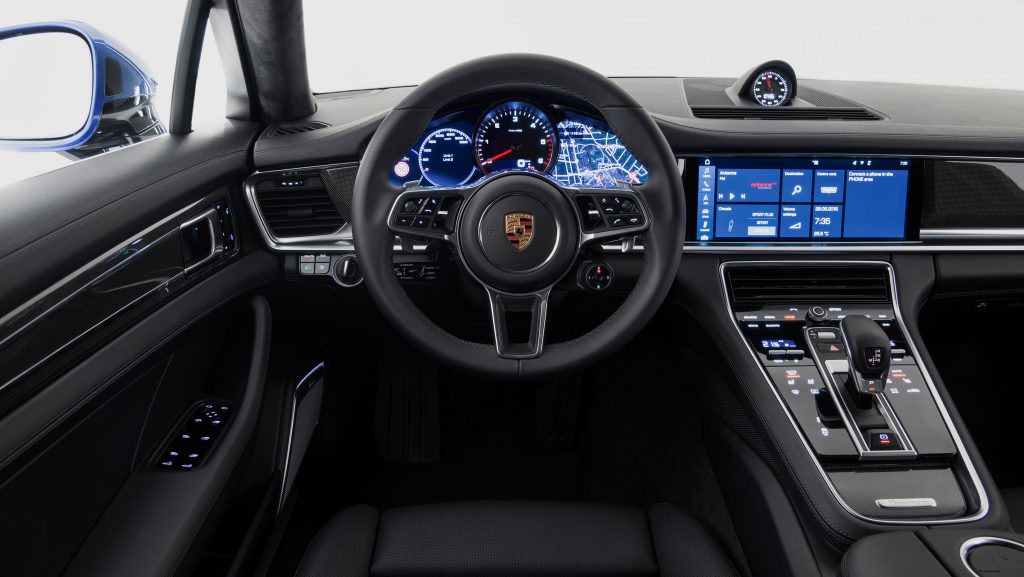
At the heart of this shift is the digital cockpit — a fully integrated tech environment that combines your instrument cluster, infotainment screen, navigation system, and driver-assist controls into one seamless experience. And for buyers shopping for suvs with navigation in digital cockpit setups, the options in 2025 have never been better or more varied.
But more options also mean more confusion. What should you actually look for? Which brands deliver and which ones overpromise? This article breaks all of it down clearly, so you can walk into a dealership knowing exactly what questions to ask.
What Exactly Is a Digital Cockpit — And Why Navigation Is the Centerpiece
Before comparing models, it helps to understand what a digital cockpit actually means in practice. The term gets used loosely by marketing teams, so the definition matters.
A true digital cockpit replaces all traditional analog gauges with high-resolution digital displays. Instead of physical needles, you see digital graphics showing your speed, RPM, fuel level, and driver-assist status. The infotainment touchscreen sits beside or extends from this cluster, forming one continuous visual surface in many modern builds.
Navigation is the feature that ties the whole system together. When a navigation map is embedded directly into the instrument cluster — right behind your steering wheel — you never have to glance away from the road to check your next turn. That is fundamentally different from propping up your phone or tapping a separate screen on the center console.
Built-in navigation vs. phone-mirrored apps. This is a question that comes up constantly. Apple CarPlay and Android Auto are convenient, but they rely on your phone’s data plan, your phone’s processing power, and a stable Bluetooth or USB connection. Built-in navigation systems, by contrast, run independently on the vehicle’s own hardware. They have dedicated processors, embedded SIM cards for live traffic data, and deep integration with the vehicle’s sensors — including speed data for more accurate positioning.
For anyone serious about suvs with navigation in digital cockpit performance, factory-fitted systems simply offer more reliability. They do not disconnect when a call comes in. They do not drain your phone battery. And in 2025, most of them receive over-the-air (OTA) map updates automatically, so the maps stay current without any effort from you.
Automakers are investing heavily in these platforms because the cockpit is now a major selling point. It influences purchase decisions as much as engine specs once did.
Top SUVs with Navigation in Digital Cockpit Worth Considering in 2025
This section covers the standout models across different price ranges. Each one handles the digital cockpit and navigation experience in its own way.
BMW iX and X5 — iDrive 8.5 and the Curved Display
BMW’s curved display setup is one of the most talked-about in the industry right now. The 12.3-inch instrument cluster and 14.9-inch infotainment screen merge into one arched panel that curves toward the driver. It feels intentional and not gimmicky. The iDrive 8.5 operating system that powers it is fast, responsive, and clean.
Navigation on the BMW iX runs through HERE Maps with real-time traffic updates via the embedded SIM. The map can be displayed in the instrument cluster alongside speed and driver-assist icons. The voice assistant has also improved significantly — you can say “Hey BMW, find a coffee shop on the way” and it will plan accordingly without pulling your attention from the road.
Mercedes-Benz GLE and EQS SUV — MBUX Hyperscreen
Mercedes took the digital cockpit concept to an almost theatrical level with the MBUX Hyperscreen, available on the EQS SUV. It is essentially a 56-inch curved glass panel stretching the full width of the dashboard, housing three separate screens under one piece of glass.
The navigation display on the EQS SUV is particularly impressive because it factors in real-world data — live traffic, construction updates, and for the electric version, charging station availability along your route. The system learns from your habits over time and begins suggesting routes before you even type a destination. For buyers looking at suvs with navigation in digital cockpit at a premium level, the EQS SUV sets a very high bar.
Audi Q8 e-tron — Virtual Cockpit Plus
Audi’s Virtual Cockpit Plus gives drivers a fully configurable 12.3-inch digital instrument display. The navigation map can be set to fill nearly the entire cluster screen when you are in navigation mode. It is clean, readable, and integrates smoothly with Audi’s three-screen MMI layout in the center console.
The Q8 e-tron adds a layer of intelligence for electric drivers. It calculates range based on current battery level, driving style, and elevation changes along the planned route. The navigation screen shows charging stops proactively, not just when the battery is low.
Ford Explorer and Mustang Mach-E — SYNC 4A
Ford’s SYNC 4A platform brings a 15.5-inch portrait-orientation touchscreen to the Mustang Mach-E, and a 13.2-inch screen to the Explorer ST-Line and higher trims. Both include built-in navigation powered by TomTom maps, with over-the-air update capability.
The Ford setup is particularly good for families. The interface is easy to hand over to a passenger to manage navigation. Wireless Apple CarPlay and Android Auto are included if you prefer phone-based maps, giving you flexibility without making you commit to one system.
Hyundai Tucson and Santa Fe — Embedded Navigation with a 12.3-Inch Cluster
Hyundai deserves more credit in conversations about suvs with navigation in digital cockpit packages. The Santa Fe, particularly in the Calligraphy trim, offers a panoramic curved 12.3-inch digital cluster paired with a 12.3-inch infotainment screen. It is one of the better mid-range implementations available.
The embedded navigation includes real-time traffic from a connected service subscription. Setup is straightforward, and the system handles highway lane guidance well, showing split-screen maps that clarify complex interchange decisions.
Budget-Friendly Picks: Kia Sportage and Nissan Rogue
Not every buyer needs or wants a luxury-tier cockpit. The Kia Sportage and Nissan Rogue both offer digital cockpit setups with embedded navigation at accessible price points. The Sportage’s curved 12.3-inch display and Rogue’s 12.3-inch digital cluster are responsive and clear. Map updates may require more manual management, but the core experience is solid.
Key Features to Look for When Comparing Navigation-Equipped Digital Cockpits
Once you have narrowed down a shortlist, it pays to compare specific features rather than just screen sizes. Here is what matters most in practice.
Screen size and split-view navigation. Bigger is not always better. What matters is whether the navigation map can display independently in the instrument cluster while other media or phone functions play on the center screen. Split-view is a feature that separates genuinely useful systems from the ones that just look impressive in photos.
OTA map updates. Some manufacturers charge an annual subscription for map updates — usually between $100 and $200 per year. Others, like Tesla and BMW, push updates automatically at no charge. Confirm this before you buy because outdated maps degrade the navigation experience quickly.
Augmented reality navigation. Several brands are now layering AR overlays onto navigation displays — showing turn arrows on a live camera feed of the road ahead. Mercedes MBUX and BMW iDrive 8.5 both offer this. It is genuinely useful in unfamiliar urban environments. Just verify it works well in daylight, not only in demos.
Voice command accuracy. Test the voice assistant during your test drive. Ask it to find a destination, change a route, and add a stop. If it requires multiple corrections, it will frustrate you daily. The best systems — BMW’s and Mercedes’ in particular — handle natural conversation rather than requiring exact phrasing.
4G or 5G embedded SIM. Live traffic, speed camera alerts, and dynamic rerouting all require a data connection. Check whether the connected service subscription is included in the purchase price or requires a separate monthly fee after a trial period.
Safety, Distraction, and the Design Philosophy Behind Digital Cockpit Navigation
There is an important tension at the center of digital cockpit design. More information on screen can mean safer driving — but it can also mean more distraction. The best manufacturers take this seriously.
Head-up display navigation. The most effective way to deliver navigation without pulling eyes off the road is through a head-up display (HUD) that projects directions onto the windshield. BMW, Mercedes, Audi, and Hyundai all offer this on higher trims. When navigation instructions appear in your natural line of sight, reaction times improve and stress decreases on unfamiliar roads.
Driver attention monitoring. Several models now link their navigation alerts to driver attention systems. If the system detects you are not looking forward when an important turn is approaching, it can increase alert volume or send a haptic signal through the steering wheel. This kind of layered safety design reflects genuine maturity in how brands are handling the digital cockpit challenge.
Physical controls still matter. There is growing consumer and safety-authority pressure on automakers to retain physical controls alongside touchscreens. Sweden’s NCAP testing, for example, now penalizes vehicles that require multiple touchscreen steps for basic functions. Volume knobs, steering wheel buttons for navigation commands, and physical climate controls reduce eyes-off-road time significantly. The best suvs with navigation in digital cockpit setups — like the BMW X5 and Audi Q8 — maintain this balance intelligently.
Digital Cockpit Navigation in Electric SUVs — A Different Ballgame
Electric SUVs add a layer of complexity to navigation that combustion engine vehicles simply do not have to deal with. Range anxiety is real, and the navigation system is the primary tool for managing it.
Range-aware routing. Vehicles like the Rivian R1S, Mercedes EQS SUV, and Audi Q8 e-tron use navigation systems that actively account for battery level when planning a route. They factor in elevation changes, current speed, temperature, and HVAC usage to generate a more accurate range estimate than the simple percentage displayed on the battery icon.
Charging station integration. Good EV navigation goes beyond pointing you toward the nearest charger. It shows you charger availability in real time, filters by connector type, and integrates payment through in-vehicle accounts on some platforms. Tesla’s navigation does this exceptionally well. Mercedes and Rivian are closing the gap quickly.
Energy data alongside directions. Some electric SUVs now display projected energy consumption per leg of your route, broken down by segment. This means you can see not just “you will arrive with 12% battery” but also which part of the drive will use the most charge — letting you adjust speed or HVAC accordingly. It is one of those features that feels minor until you have used it, at which point you wonder how you managed without it.
The integration of range management and turn-by-turn directions in one intelligent screen is one of the strongest arguments for choosing suvs with navigation in digital cockpit platforms over phone-based solutions in an electric vehicle.
Subscription Costs, Hidden Fees, and What Buyers Often Miss
This is the part of the conversation that tends to get skipped in test drives and showroom visits. The navigation screen looks great during a demo. What is less visible is the fee structure that activates after the first year.
Which brands offer free lifetime navigation. Tesla includes map updates and connected navigation services as part of the vehicle’s basic software package. Ford’s SYNC 4A includes TomTom maps with OTA updates at no added cost. BMW includes three years of connected navigation services from purchase, after which a subscription applies.
Locked-behind-a-paywall features. Mercedes MBUX Intelligence, which delivers the predictive navigation suggestions described earlier, requires an active Mercedes me connect subscription. Hyundai’s real-time traffic integration similarly sits behind a bluelink subscription. These are not unreasonable prices, but they are not always disclosed prominently. Always ask the dealer to walk you through exactly which navigation features are active for free and which require an ongoing payment.
Third-party apps as a backup. If subscription costs are a concern, most modern digital cockpits still support Apple CarPlay and Android Auto as a fallback. Google Maps running through CarPlay or Android Auto, combined with a wireless connection, is a perfectly capable navigation experience. The main trade-off is losing instrument cluster integration and the deep vehicle-data features that make built-in systems genuinely valuable.
Being honest about subscription costs is part of what sets well-researched buyers apart. The suvs with navigation in digital cockpit setups that hold their value best over time tend to be the ones with transparent, reasonable connected service models.
Choosing the Right SUV with Navigation in Digital Cockpit — Final Thoughts
After covering the full landscape, a few clear principles emerge for buyers navigating this decision.
Prioritize OTA updates. A navigation system that you have to take to a dealership to update will fall behind. Choose a brand that pushes updates automatically.
Test the interface before you commit. Screens look different in a darkened showroom than they do in bright afternoon sun on the highway. Ask to take the vehicle on a real route during your test drive — one that involves a highway merge, a complex intersection, and a destination search from scratch.
Read the fine print on subscriptions. Know exactly what you are paying for after the complimentary period ends, and factor that into your total cost of ownership.
Match the feature level to your actual needs. A buyer who drives well-known daily routes has different needs than someone who travels frequently through unfamiliar cities. The most expensive system is not always the most appropriate one.
Think about EV-specific navigation if you are going electric. For electric SUV buyers especially, the quality of range-aware navigation is not a luxury — it is a practical necessity. Platforms that handle charging integration well will reduce stress on longer trips significantly.
The market for suvs with navigation in digital cockpit technology is evolving fast. What felt cutting-edge eighteen months ago is already being updated. Models like the BMW iX, Mercedes EQS SUV, Audi Q8 e-tron, and Hyundai Santa Fe represent genuinely strong options in 2025, but the gap between premium and mid-range is narrowing every model year.
The best advice remains simple. Know your budget, test the system in person, and understand what you are committing to beyond the sticker price.
FAQ 1. What is a digital cockpit in an SUV and how does navigation fit into it?
A digital cockpit replaces traditional analog gauges with high-resolution digital displays that unify speed, media, driver-assist info, and navigation into one visual environment. Navigation is placed directly in the instrument cluster — right in the driver’s line of sight — rather than on a separate side screen. This reduces distraction significantly compared to older dashboard layouts.
FAQ 2. How is built-in SUV navigation different from using Google Maps or Apple CarPlay?
Factory navigation runs on the vehicle’s own hardware and embedded SIM, enabling deep integration with the instrument cluster, HUD, and vehicle sensors for more accurate positioning. CarPlay and Android Auto use your phone’s data and processing power, which is convenient but cannot display turn-by-turn directions in the instrument cluster in the same deeply integrated way. For EV drivers especially, factory navigation also handles range-aware routing that phone apps cannot replicate.
FAQ 3. What does navigation in the instrument cluster actually look like while driving?
The navigation map occupies a portion of the digital display directly behind the steering wheel, alongside speed, ADAS status, and fuel or battery level. Turn-by-turn arrows appear prominently so drivers can follow directions without ever shifting their gaze to the center console. Some systems like Audi Virtual Cockpit Plus can expand the map to fill the entire cluster screen when in full navigation mode.
FAQ 4. What is augmented reality navigation and which SUVs offer it?
AR navigation overlays directional arrows and lane guidance onto a live camera feed of the road ahead, shown on the infotainment or cluster display. It is especially useful at complex intersections and unfamiliar urban roads. BMW iDrive 8.5 (iX, X5, X7), Mercedes MBUX (GLE, EQS SUV), and Audi MMI (Q7, Q8) all offer AR navigation features on higher trim levels as of 2025.
FAQ 5. Which SUVs have the best navigation in a digital cockpit in 2025?
The BMW iX and X5 (iDrive 8.5 curved display), Mercedes EQS SUV (MBUX Hyperscreen), and Audi Q8 e-tron (Virtual Cockpit Plus) lead the premium segment. For mid-range buyers, the Hyundai Santa Fe Calligraphy and Kia Sportage offer competitive 12.3-inch digital cluster navigation at significantly lower price points. Ford’s SYNC 4A on the Mustang Mach-E and Explorer also earns strong ratings for everyday usability and transparency of subscription costs.
FAQ 6. Does the Mercedes EQS SUV really have the biggest digital cockpit navigation screen?
The Mercedes EQS SUV’s MBUX Hyperscreen spans 56 inches across the dashboard under a single curved glass panel, making it one of the largest unified digital surfaces in any production SUV. The Cadillac Escalade is close behind with 55 inches of shared display space. Both integrate navigation prominently, though the Escalade relies more heavily on touchscreen interaction with fewer physical controls alongside it.
FAQ 7. Which affordable SUVs under $40,000 have navigation built into a digital cockpit?
The Hyundai Tucson, Kia Sportage, Volkswagen Tiguan with Digital Cockpit Pro, Nissan Rogue, and the refreshed 2025 Mazda CX-5 all offer digital instrument clusters with embedded navigation under or around the $40,000 mark. These models may lack AR overlays or HUD projection but provide reliable, real-time navigation integrated directly into the driver display without requiring a luxury-tier budget.
FAQ 8. Is the Volkswagen Digital Cockpit Pro good for navigation in SUVs?
Yes — the VW Digital Cockpit Pro, available on models like the Atlas and Tiguan, offers a fully configurable 10.25-inch display with a full-screen navigation mode. Drivers can toggle between navigation, performance data, and media views easily. It pairs cleanly with Wireless App-Connect for CarPlay and Android Auto as a complement, making it one of the better balanced systems at the non-premium price level.
FAQ 9. Does navigation in a digital cockpit actually make driving safer?
Research supports that placing navigation in the driver’s direct line of sight reduces the time eyes spend off the road compared to glancing at a center console screen. A 2025 industry report noted AR-based HUDs are being prioritized specifically to minimize driver distraction and improve ADAS alert visibility. Physical steering wheel controls for navigation input further reduce cognitive load and eyes-off-road time during active driving.
FAQ 10. What is a heads-up display (HUD) and how does it work with SUV navigation?
A HUD projects navigation directions, speed, and safety alerts directly onto the lower portion of the windshield so they appear to float in the driver’s natural forward view. Turn instructions are visible without any eye movement away from the road. Color HUDs — available on BMW, Audi, Mercedes, and Hyundai — are significantly more readable and practical than older monochrome versions found in earlier vehicles.
FAQ 11. Can you use voice commands to control navigation in a digital cockpit SUV?
Yes — virtually all modern digital cockpit SUVs support voice-controlled navigation. BMW’s “Hey BMW,” Mercedes’ “Hey Mercedes,” and Hyundai’s built-in voice assistant all accept natural language commands for setting destinations, adding stops, and rerouting. Some systems also integrate Amazon Alexa or Google Assistant as alternatives. Voice accuracy varies considerably between brands, so testing this specifically during a test drive is strongly recommended before purchase.
FAQ 12. How does real-time traffic work in a digital cockpit navigation system?
Real-time traffic data is delivered through an embedded 4G or 5G SIM card in the vehicle, connecting to navigation map providers like HERE Technologies or TomTom. The system continuously monitors traffic conditions, construction zones, and road closures, then dynamically reroutes the journey if a faster path becomes available — without any manual input needed from the driver. An active connected services subscription is typically required to keep this feature running after the trial period.
FAQ 13. Can multiple drivers save their own navigation preferences in an SUV digital cockpit?
Yes — most premium and mid-range digital cockpit SUVs support multiple driver profiles. Each profile stores preferred navigation display layout, map zoom level, HUD settings, and frequently visited destinations. Models like the Volkswagen Atlas Cross Sport, BMW X5, and Mercedes GLE all support personalized cockpit configurations tied to individual drivers, which is particularly useful in households where more than one person regularly drives the same vehicle.
FAQ 14. Do SUVs with navigation in a digital cockpit receive automatic map updates?
It depends on the brand. Tesla, Ford (SYNC 4A), and Rivian push OTA map updates automatically at no extra cost. BMW provides three years of connected navigation services free from purchase, after which a subscription applies. Mercedes and Hyundai require active connected service subscriptions for live traffic data and map currency. Always confirm the exact update policy directly with the dealer before signing a purchase agreement.
FAQ 15. How much does it cost to keep navigation updated in an SUV digital cockpit?
Subscription costs vary by brand. Mercedes Me Connect, Hyundai Bluelink, and BMW Connected Drive typically range from $80 to $200 per year after the initial free trial period, which is usually one to three years from purchase. Stellantis vehicles — including Jeep and RAM models — include a free decade of basic connected services on new purchases. Tesla’s standard connectivity, which covers navigation, is free for the first eight years.
FAQ 16. What navigation features get locked behind a subscription in an SUV digital cockpit?
Features that typically require an active subscription include real-time traffic rerouting, live speed camera alerts, predictive navigation (AI-suggested routes based on your habits), and online points-of-interest search. Offline navigation using pre-downloaded maps usually remains available without a subscription, though the maps will become progressively outdated over time without connected updates pushing new data to the system.
FAQ 17. How is navigation different in an electric SUV with a digital cockpit compared to a gas model?
Electric SUVs use range-aware navigation that factors battery charge level, elevation changes, temperature, and current driving behavior into route planning. The digital cockpit displays energy consumption per route segment alongside turn-by-turn directions. Charging stations are integrated directly into the navigation map with real-time availability and compatible connector type shown — a level of functionality that gas-powered SUV navigation systems simply do not require or offer.
FAQ 18. Which electric SUVs have the best range-aware navigation in their digital cockpit?
The Tesla Model Y and Model X remain benchmarks for charging-integrated navigation, factoring elevation and weather into range estimates with high accuracy. The Mercedes EQS SUV handles EV routing particularly well through MBUX’s intelligent charge planning. The Rivian R1S and Audi Q8 e-tron also offer strong range-aware navigation that proactively suggests charging stops before the battery level becomes a serious concern on longer trips.
FAQ 19. Will AI improve navigation in digital cockpit SUVs in the near future?
Yes, significantly. Industry analysts project that machine-learning voice assistants will be standard in over 60% of digital cockpits by 2028. AI-driven systems are already learning individual driver habits to suggest routes proactively and adapt display settings to time of day and driving conditions. The global automotive digital cockpit market — valued at $34.74 billion in 2025 — is projected to reach $80.23 billion by 2034, with AI personalization identified as a primary growth driver across all vehicle segments.
FAQ 20. What is 5G connectivity doing for digital cockpit navigation in SUVs?
5G embedded SIM cards enable near-instant map data refresh, faster traffic rerouting, and live streaming of detailed 3D map content that would be impractical over a 4G connection. It also supports more seamless over-the-air software updates for the entire cockpit system, meaning navigation improvements can be pushed in the background without dealer visits or driver action. Several 2025 models — including those from BMW, Mercedes, and Rivian — are already shipping with 5G-ready modems installed.
FAQ 21. What should I check during a test drive when evaluating an SUV’s digital cockpit navigation?
Test the system on a real route, not just in a parking lot. Specifically: set a destination using only voice commands, check how the navigation map looks in bright sunlight through the windshield, verify that turn-by-turn directions appear in the instrument cluster behind the steering wheel (not only on the center screen), and attempt to add a mid-route stop. Also test touchscreen response speed and whether physical controls exist for core functions like volume adjustment and map zoom.
FAQ 22. Is a digital cockpit navigation system worth the extra cost over a basic infotainment screen?
For frequent or long-distance drivers, yes — the reduction in distraction alone justifies the upgrade for most people. Having navigation displayed directly in the instrument cluster means fewer glances away from the road on unfamiliar routes. For drivers who stick to a familiar daily commute, a basic screen with CarPlay may be entirely sufficient. The value shifts significantly if you are also considering an electric vehicle, where range-aware navigation built into the digital cockpit becomes practically essential rather than a luxury.
FAQ 23. Can I add navigation to an SUV digital cockpit if my current trim does not include it?
In some cases, yes. Several manufacturers allow navigation to be activated via a software unlock after purchase — particularly BMW, Volkswagen, and Mercedes — through their connected vehicle apps or dealer activation. However, if the hardware (embedded SIM or specific display hardware) was not installed at the factory, a software activation alone will not add true built-in navigation. Aftermarket head unit replacements are another option but rarely integrate with the digital instrument cluster the way a factory system does.
FAQ 24. How do I know if an SUV’s digital cockpit navigation uses HERE Maps, TomTom, or Google Maps?
BMW and Mercedes factory navigation systems primarily use HERE Technologies maps, while Ford SYNC 4A uses TomTom. Google Maps integration via Google Built-In is expanding through Android Automotive OS, which powers systems in Volvo, Polestar, and selected GM vehicles. Tesla uses its own proprietary mapping system built on OpenStreetMap data. The map provider matters for points-of-interest database freshness and accuracy in rural or less-mapped areas, so it is worth verifying for your primary driving region before purchase.

